 QuestVoice
A real voice, not a robot
Quests are read by a very high quality AI voice: natural intonation, emotion and rhythm. Nothing like the built-in Windows text-to-speech.
QuestVoice is a free Windows app that reads every quest aloud with an expressive AI voice, not a robotic text-to-speech one. Each character has their own voice and a narrator tells the atmospheric passages, so you finally enjoy the story instead of skimming it. Works only with World of Warcraft Forever (not Retail).
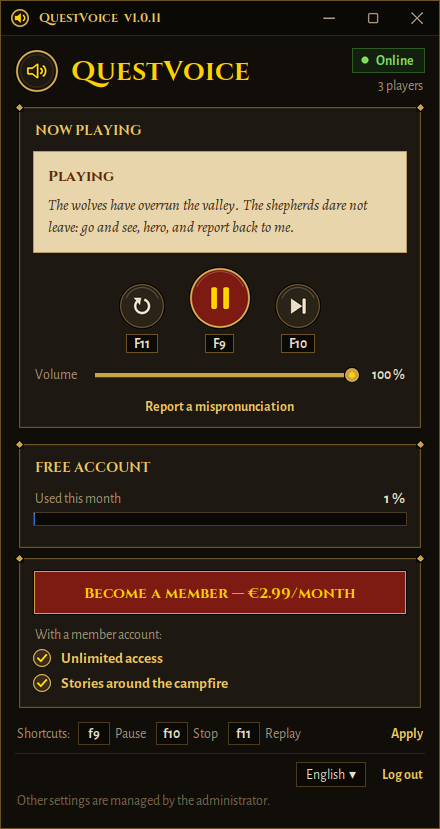
Everything you need to hear the story of WoW, without changing how you play.
Quests are read by a very high quality AI voice: natural intonation, emotion and rhythm. Nothing like the built-in Windows text-to-speech.
Male and female voices chosen for the character speaking to you, with variations by race (elves, dwarves, orcs…).
Passages written between angle brackets, such as gestures and attitudes, are told by a narrator rather than by the character.
Three configurable keyboard shortcuts (F9, F10, F11 by default) to control playback without leaving the game, plus a volume slider.
Close the quest window and go on adventuring: the voice finishes reading. A new quest replaces the previous one.
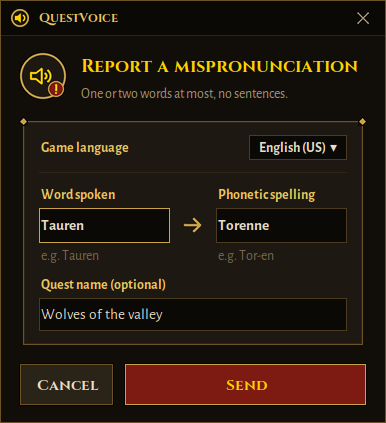
A name sounds wrong? The “Report a mispronunciation” button sends the correction, and every player benefits from it.
QuestVoice does not modify the game, does not read its memory and sends no keystrokes. A small addon shows the quest text in a strip of pixels that the app reads on screen.
QuestVoice works only with World of Warcraft Forever. Retail and the other game versions are not supported.
Gold: available. Greyed out: coming soon.
More languages are coming soon, once the French version is fully working.
More features are on the way, such as stories around the campfire.
Instead of clicking “Accept” without reading, let the quest tell its story. Listen.
A human man
Les gardes de Stormwind ont beaucoup à faire afin de maintenir la paix en ces lieux, tandis que nombre d'entre nous sont en des terres lointaines et que tellement de dangers nous menacent. Aussi acceptons-nous l'aide de tous ceux qui souhaitent défendre leur demeure. Et leur alliance également.
Si votre volonté est de répondre à cet appel, allez parler à mon supérieur, le maréchal McBride.
An Éolide woman
J’imagine que vous êtes à la fois nerveuse et impatiente à l’idée de ce qui vous attend. Après tout, on ne devient adulte qu’une seule fois dans sa vie !
The narrator
Objectif : Lire la note gravée et parler à Lanka Farshot sur la Mesa de Nuage-Rouge
Real samples, in French.
Five minutes, no technical skills needed.
Download the ZIP archive and extract it (right-click, “Extract all”). It contains QuestVoice.exe and the WoW addon.
In your World of Warcraft folder, open _classic_beta_, then copy the QuestVoice folder into Interface\AddOns.
Run QuestVoice.exe, create your free account (a 6-digit code is sent to you by email), then open a quest in WoW: it is read aloud.
Important: in WoW, set System › Graphics › Display Mode: Windowed (Fullscreen). The app reads the small strip of pixels drawn by the addon, so it must stay visible on screen. Windows may also show a warning because the app is not code-signed yet: click “More info”, then “Run anyway”.
Free sign-up, and mispronounced words reported in a few seconds.
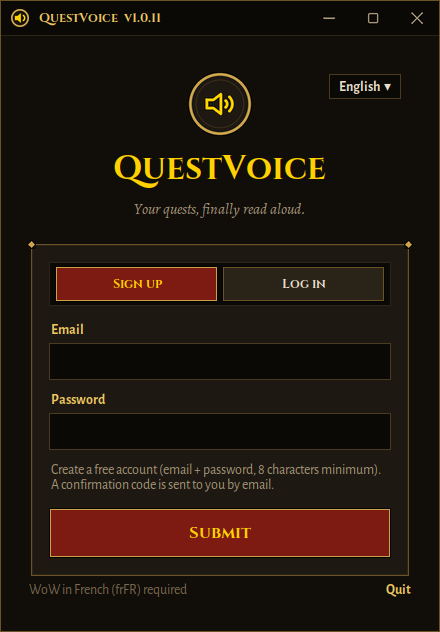
The same voices for everyone. The difference is in limits and perks.
0 € forever
€2,99 per month
To become a member, use the “Become a member” button inside the app.
Secure payment by Stripe. Cancel any time by writing to us.
Yes, to start with: the free account gives access to the same voices, with a monthly reading quota. The member subscription (€2,99 per month) removes that limit.
For now, with the French World of Warcraft Forever client (frFR). Other languages (English, German, Spanish…) are planned: the list is in the “Compatibility” section.
World of Warcraft Forever only. Retail and the other game versions are not supported. The addon goes into the _classic_beta_ folder. If WoW flags it as out of date, tick “Load out of date AddOns” on the character selection screen.
The app reads a small strip of pixels drawn by the addon on screen. This mode keeps the look of fullscreen while leaving the strip reachable.
QuestVoice does not modify the game, does not read WoW's memory and sends no keystrokes or actions to the game: it only reads aloud the text the addon passes to it. It is not affiliated with Blizzard, though, and you remain responsible for following the game's rules.
The app is not code-signed yet and very few people have downloaded it so far, so the filters in Microsoft Edge, Chrome and Windows are cautious with any new independent software. This is not a sign of a virus. In Edge, open the downloads list (Ctrl+J), click the three dots next to the file, then “Keep” and “Keep anyway”. In Chrome, click the arrow on the message, then “Keep”. When you run QuestVoice.exe, if Windows shows “Windows protected your PC”, click “More info”, then “Run anyway”. You can also scan the file on virustotal.com before opening it.
Your email address is used to create your account. Quest text is sent to our servers to generate or retrieve the audio. This website uses no cookies. Full details are in the privacy policy.
Click “Report a mispronunciation” in the app, enter the word spoken and its phonetic spelling. Accepted corrections are added for every player.
Not at the moment: QuestVoice runs on Windows 10 and 11.
Write to us at [email protected]: the subscription ends at the end of the period already paid.
Download QuestVoice, open a quest and let the voice do the rest.